
SwishLand User Guide
Your complete guide to mastering NBA betting with SwishLand's analytics platform
What is SwishLand?
SwishLand is a comprehensive NBA betting analytics platform that gives you an edge in the marketplace. Our system combines proprietary projections, real-time injury intelligence, and contextual analysis across four powerful tabs.
🎯 Player Tab
Deep dive into individual player projections, trends, and game-by-game breakdowns with visual charts and contextual intel.
👥 Team Tab
Full roster projections with boost badges, injury beneficiaries, and team-level intelligence at a glance.
⚔️ Matchup Tab
Opponent analysis featuring the Misery Index, player types, rest advantages, and blowout risk assessment.
💬 AI Chat
Ask questions about players, matchups, and betting strategies. Get instant answers powered by SwishLand's data.
The Art of Finding Edge
Edge exists where the market misprices reality. SwishLand helps you find these opportunities by surfacing information the market hasn't fully absorbed yet.
Breaking Injury Intel
- Real-time injury updates before lines move
- Minute redistribution projections
- Injury beneficiary identification
Context That Matters
- Rest advantages (B2B, travel, days off)
- Opponent defensive weaknesses
- Blowout risk and garbage time potential
Pattern Recognition
- Last 10 game trends with visual charts
- Usage boost badges from injuries
- Matchup-specific player types
The best edges come from combining multiple factors. A player with a usage boost badge, facing a weak opponent defense, with no blowout risk, is a much stronger play than any single factor alone.
Player Tab Overview
The Player Tab is your command center for individual player analysis. It combines projections, historical trends, and contextual intelligence in one place.
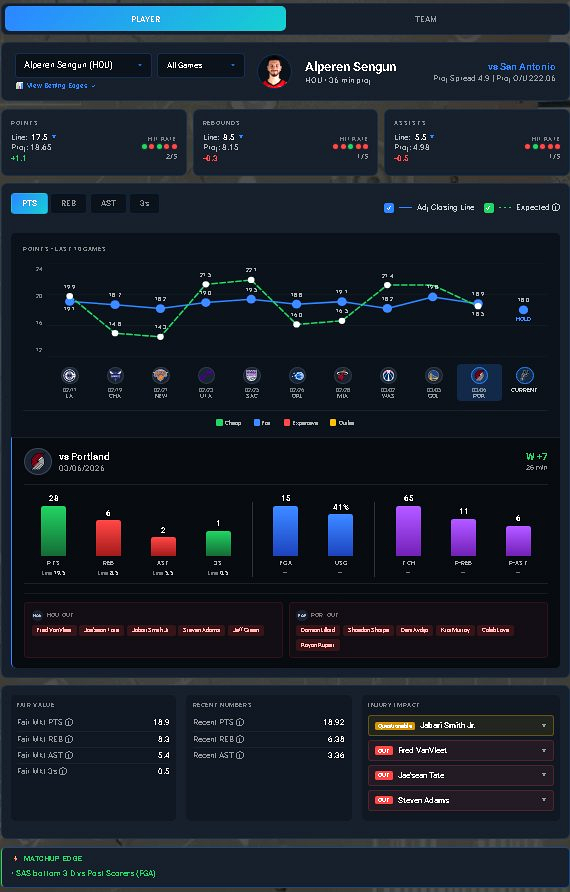
Player Tab showing Alperen Sengun's projections, trend chart, and contextual analysis
Key Components
Projections vs Lines
- SwishLand Projection: Our proprietary model's forecast
- Market Line: Current betting line from sportsbooks
- Edge Indicator: Green (over value) or Red (under value)
- Compare across points, rebounds, assists, PRA, and more
Last 10 Games Chart
- Visual trend line showing recent performance
- Green line = current market line for reference
- Spot hot/cold streaks at a glance
- See consistency vs volatility patterns
Game Breakdown
- Last 10 games with actual stats
- Opponent and result for each game
- Identify matchup-specific patterns
- Filter for home/away or opponent type
Context Sections
Below the main stats, you'll find critical context that affects player performance:
Intel Notes
Real-time updates on injuries, lineup changes, and situational factors that impact this player or their teammates. Updated throughout the day as news breaks.
Opponent Analysis
How the opponent's defense performs against this player's position. Look for defensive weaknesses to exploit.
Rest & Travel
Days since last game, back-to-back status, and travel distance. Fatigue matters, especially late in the season.
Team Tab Overview
The Team Tab gives you a bird's-eye view of an entire roster, making it easy to spot injury value and usage shifts across multiple players at once.
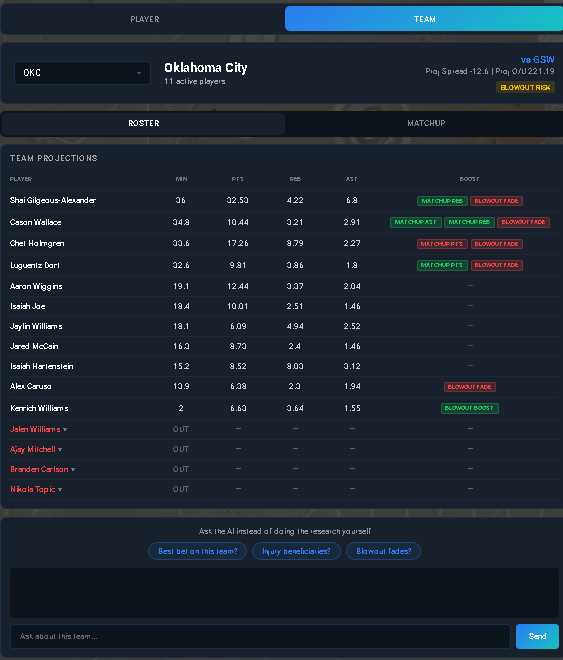
Team Tab showing Oklahoma City's full roster with boost badges and projections
Key Features
Roster Projections
- Every player's projections in one view
- Sorted by projected minutes or usage
- Quickly compare across positions
- Spot depth chart changes
Boost Badges
- Green badges = usage boost from injury
- Shows which players benefit from absences
- Automatically calculated minute redistribution
- Critical for finding injury value plays
Team Intel Bar
- Team-wide injury news at the top
- Lineup confirmations and updates
- Game notes (pace, rest, opponent)
- Updated in real-time throughout the day
When a star player is out, scan the Team Tab for green boost badges. The market often undervalues how minutes get redistributed across multiple players, not just one replacement.
Matchup Tab Overview
The Matchup Tab helps you understand opponent defense and game environment factors that create edges.
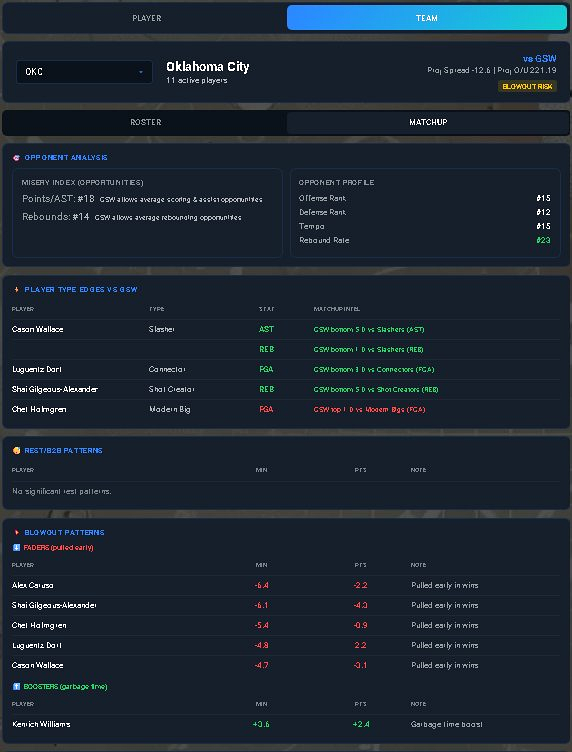
Matchup Tab showing Misery Index, player types, and rest/blowout analysis
Key Components
Misery Index
- Opponent's defensive rating by position
- Lower = worse defense = more points allowed
- Target players facing weak position defenses
- Avoid players facing elite defenders
Player Types
- How opponent performs vs scorers, rebounders, playmakers
- Spot matchup-specific advantages
- Example: Weak vs rim runners, strong vs shooters
- Adjust strategy based on player archetype
Rest & Blowout Analysis
- Rest: Days off for both teams
- B2B: Back-to-back game disadvantage
- Blowout Risk: High = garbage time concern
- Pace and game total expectations
Understanding Intel
Intel is the lifeblood of finding edge before the market moves. SwishLand surfaces breaking news and injury information in real-time.
Intel Notes
- Injury updates (OUT, DOUBTFUL, QUESTIONABLE)
- Lineup confirmations (starting lineup changes)
- Load management and rest days
- Minute restriction or pitch count
Injury Beneficiaries
- Shows which players gain usage from injuries
- Projected minute redistribution
- Usage boost percentages
- Automatically updates as lineups change
Join the SwishLand Discord for instant injury alerts. Intel posted there often appears before it hits mainstream news, giving you a window to get bets down before lines move.
Using the AI Chat
The AI Chat feature lets you ask natural language questions about players, matchups, and betting strategies. It's powered by SwishLand's full dataset.
What You Can Ask
- "Who are the best rebounding plays tonight?"
- "Show me Luka's stats vs the Warriors"
- "Which players benefit if Embiid sits?"
- "What's the Misery Index for centers vs Portland?"
What It Can't Do
- Place bets for you
- Predict exact outcomes
- Access live in-game data
- Provide financial advice
Use the AI Chat to quickly compare multiple players or to ask "what if" questions about injury scenarios. It's faster than clicking through tabs manually.
Suggested Workflows
Here are proven workflows for using SwishLand to find profitable betting opportunities.
Workflow 1: Research a Player Prop
- Start with Player Tab: Pull up your target player and check the projection vs line
- Review Last 10 Chart: Is the player trending up, down, or consistent?
- Check Intel Notes: Any injury news affecting this player or teammates?
- Switch to Matchup Tab: Look at Misery Index and player type matchups
- Assess Rest/Blowout: Any fatigue or garbage time concerns?
- Compare Team Tab: See if boost badges suggest usage changes
- Make Decision: If multiple factors align, you have a strong edge
Workflow 2: Find Injury Value
- Check Discord/Intel Feed: See who's been ruled OUT
- Go to Team Tab: Pull up the affected team's roster
- Look for Boost Badges: Identify all players with green badges
- Review Beneficiary Projections: Compare projected usage increase to current lines
- Act Fast: Lines move quickly on injury news - bet before the market catches up
The most profitable workflow is checking Discord for breaking injury news, then immediately going to the Team Tab to spot boost badges before lines adjust. Speed matters.